
Download Ultimate Washer – Free Duplicate File Detection Tool for Windows
Ultimate Washer is a powerful and secure Windows utility developed by OGnizer, designed to help users efficiently detect and remove duplicate files across multiple storage devices. With a remarkable precision rate of 95% to 100%, this software leverages advanced byte-by-byte comparison technology to identify exact duplicates with minimal false positives. Whether you're dealing with cluttered local drives, external hard drives, or USB flash drives, Ultimate Washer ensures your system stays clean and optimized. Beyond file cleanup, the tool offers a suite of additional features including registry scanning, startup manager, real-time process monitoring, and malware protection against harmful worms. This all-in-one approach makes Ultimate Washer an essential tool for both casual users and tech-savvy individuals aiming to improve their PC’s performance and storage efficiency.
Key Features of Ultimate Washer
Ultimate Washer stands out in the crowded field of system optimization tools due to its robust and intelligent feature set. The core functionality—duplicate file detection—is powered by a highly accurate byte-level comparison engine, ensuring that only true duplicates are flagged. This precision minimizes the risk of accidentally deleting important files, which is a common concern with less sophisticated tools. Users can scan multiple drives simultaneously, including internal SSDs, external hard drives, and removable storage like USB flash drives, making it ideal for users managing large multimedia libraries or backup collections.
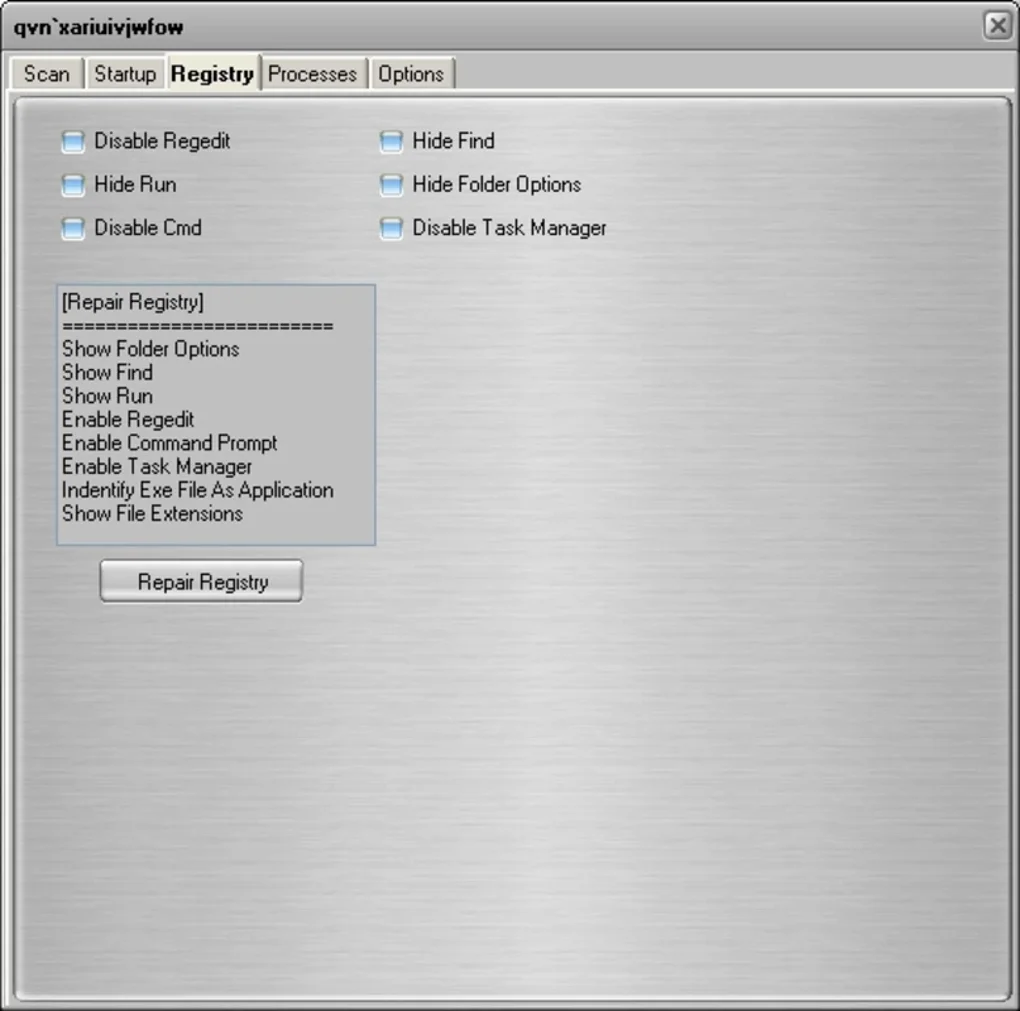
One of the standout features is the built-in registry scanner, which identifies outdated or corrupted entries that can slow down your system over time. By cleaning up these entries, Ultimate Washer helps maintain system stability and speed. The startup manager allows users to disable unnecessary programs from launching at boot, significantly reducing startup times. Additionally, the real-time process monitor provides visibility into running applications and background services, helping identify resource hogs that may be affecting performance.
For security-conscious users, Ultimate Washer includes a malware scanner that detects and removes harmful worms—often overlooked threats that can compromise system integrity. Unlike many free tools that focus solely on file cleanup, this software combines optimization, security, and maintenance in one seamless interface. The user-friendly dashboard presents all tools in an organized layout, making it easy to navigate even for beginners. With automatic update checks and a lightweight footprint, Ultimate Washer runs efficiently without slowing down your system.
Installation & Usage Guide
Installing Ultimate Washer is a straightforward process, designed with user convenience in mind. Begin by downloading the latest version from the official OGnizer website. The installer is compact and free from bundled adware, ensuring a clean and secure setup. Once downloaded, run the executable file and follow the on-screen prompts. The installation wizard will guide you through the process, allowing you to choose the installation directory and create desktop shortcuts if desired.
After installation, launch the application. The main interface greets you with a clean, intuitive dashboard that organizes all tools under clearly labeled tabs. To start scanning for duplicates, click on the "Duplicate File Finder" tab. Here, you can select the drives or folders you want to scan—whether it’s your C: drive, a connected external hard drive, or a specific folder like "Documents" or "Pictures." You can also set custom criteria such as file type (e.g., .jpg, .mp4) or minimum file size to refine results.
Once the scan completes, Ultimate Washer displays a detailed list of duplicates, grouped by file name and location. You can preview files before deletion to ensure accuracy. The tool also allows you to create a backup of files before removal, adding an extra layer of safety. After reviewing the results, select the duplicates you want to delete and confirm. The software handles the rest, freeing up valuable disk space instantly.
For ongoing maintenance, schedule automatic scans via the "Settings" menu. You can set the tool to run weekly or monthly, ensuring your system remains clutter-free without manual intervention. The real-time process monitor and startup manager can be accessed anytime from the main menu, providing continuous system oversight. With minimal system resource usage and no complex configuration, Ultimate Washer is ideal for users of all experience levels.
Compatibility & System Requirements
Ultimate Washer is specifically designed for the Windows operating system and supports a wide range of versions, including Windows 10, Windows 11, Windows 8.1, and Windows 7 (with Service Pack 1). It is compatible with both 32-bit and 64-bit architectures, ensuring broad accessibility across older and newer machines. The software is optimized to run efficiently on systems with as little as 2GB of RAM and a dual-core processor, making it suitable even for low-end laptops and desktops.
Since it operates at the file system level, Ultimate Washer can access all connected storage devices, including internal hard drives, SSDs, external HDDs, USB flash drives, and network drives. This versatility makes it perfect for users who frequently transfer files between devices or maintain large media collections. The tool does not require administrative privileges for basic scanning, though some features like registry editing and startup management may require elevated rights.
Importantly, Ultimate Washer does not interfere with system files or protected directories by default. It focuses on user-generated content such as documents, photos, videos, and downloads. This safety-first approach ensures that your system remains stable and secure during and after cleanup. The software also integrates smoothly with Windows Explorer, allowing you to right-click files and quickly initiate scans or comparisons.
While Ultimate Washer is currently exclusive to Windows, OGnizer has hinted at future development for Mac and Linux platforms. For now, Windows users have access to a reliable, free, and regularly updated tool that delivers professional-grade performance without the cost. Automatic update notifications keep the software current with the latest security patches and feature enhancements.
Pros and Cons
- High accuracy in detecting duplicates using byte-level comparison (95%–100% precision)
- Comprehensive toolset including registry cleaner, startup manager, and process monitor
- Secure deletion with backup options and preview before removal
- Lightweight and efficient—minimal impact on system performance
- Free to download and use with no hidden costs or trial limitations
- Easy to use with intuitive interface suitable for beginners
- Automatic scanning and update support for ongoing maintenance
- Supports multiple drives including external and network storage
- Malware protection against harmful worms (rare in free tools)
- No Mac or Linux version available yet (Windows-only)
- Advanced features may require some learning for new users
- Registry editing carries risk if misused (though warnings are provided)
- Some features like process monitoring may be overwhelming for casual users
- Occasional false positives in rare file types with identical content but different metadata
Frequently Asked Questions (FAQ)
Is Ultimate Washer safe to use?
Yes, Ultimate Washer is safe to use. It employs a secure deletion method and includes a backup feature before removing files. The software does not modify system files or critical Windows components. Additionally, it includes a malware scanner to detect harmful worms, enhancing overall system security.
Can I use Ultimate Washer to clean up my external hard drive?
Absolutely. Ultimate Washer supports scanning of external hard drives, USB flash drives, and network drives. It can detect duplicate files across multiple devices, making it ideal for managing large media libraries or backup collections.
Does Ultimate Washer offer automatic updates?
Yes, Ultimate Washer checks for updates automatically. When a new version is available, you’ll receive a notification, ensuring you always have the latest features and security patches.
Can I restore deleted files after using Ultimate Washer?
Yes, the software allows you to create a backup of files before deletion. If needed, you can restore them from the backup folder. However, once files are permanently deleted without backup, recovery is not guaranteed.
Is Ultimate Washer free to download and use?
Yes, Ultimate Washer is completely free to download and use. There are no trial periods, hidden fees, or premium features locked behind paywalls. The full suite of tools is available at no cost.
Conclusion & Call to Action
Ultimate Washer is more than just a duplicate file remover—it’s a complete system optimization suite that delivers on its promises. With its high-precision detection, user-friendly interface, and additional tools like registry cleaning and malware protection, it stands out as one of the most reliable free utilities for Windows users. Whether you're a student managing large project files, a photographer with gigabytes of photos, or a home user trying to reclaim disk space, Ultimate Washer provides a secure and efficient solution.
Its compatibility with all major Windows versions, support for external drives, and automatic update system make it a future-proof choice. While it’s currently limited to Windows, the software’s robust feature set and commitment to user safety make it a top contender in the free software category.
Download Ultimate Washer today and take full control of your digital space. Free, secure, and powerful—this tool is a must-have for anyone serious about maintaining a fast, clean, and optimized Windows PC.







